File: //opt/OpenManusWeb/README.md
English | [中文](README_zh.md)
[](https://github.com/gregpr07/browser-use/stargazers)  
[](https://twitter.com/openmanus)  
[](https://discord.gg/6dn7Sa3a)  
[](https://opensource.org/licenses/MIT)
# 👋 OpenManus
Manus is incredible, but OpenManus can achieve any idea without an *Invite Code* 🛫!
Our team
members [@mannaandpoem](https://github.com/mannaandpoem) [@XiangJinyu](https://github.com/XiangJinyu) [@MoshiQAQ](https://github.com/MoshiQAQ) [@didiforgithub](https://github.com/didiforgithub) [@stellaHSR](https://github.com/stellaHSR)
and [@Xinyu Zhang](https://x.com/xinyzng), we are from [@MetaGPT](https://github.com/geekan/MetaGPT) etc. The prototype
is launched within 3 hours and we are keeping building!
It's a simple implementation, so we welcome any suggestions, contributions, and feedback!
Enjoy your own agent with OpenManus!
We're also excited to introduce [OpenManus-RL](https://github.com/OpenManus/OpenManus-RL), an open-source project dedicated to reinforcement learning (RL)- based (such as GRPO) tuning methods for LLM agents, developed collaboratively by researchers from UIUC and OpenManus.
## Web Interface Preview

The web interface is developed by [@YunQiAI](https://github.com/YunQiAI).
For more information, please refer to [app/web/README.md](app/web/README.md).
## Project Demo
<video src="https://private-user-images.githubusercontent.com/61239030/420168772-6dcfd0d2-9142-45d9-b74e-d10aa75073c6.mp4?jwt=eyJhbGciOiJIUzI1NiIsInR5cCI6IkpXVCJ9.eyJpc3MiOiJnaXRodWIuY29tIiwiYXVkIjoicmF3LmdpdGh1YnVzZXJjb250ZW50LmNvbSIsImtleSI6ImtleTUiLCJleHAiOjE3NDEzMTgwNTksIm5iZiI6MTc0MTMxNzc1OSwicGF0aCI6Ii82MTIzOTAzMC80MjAxNjg3NzItNmRjZmQwZDItOTE0Mi00NWQ5LWI3NGUtZDEwYWE3NTA3M2M2Lm1wND9YLUFtei1BbGdvcml0aG09QVdTNC1ITUFDLVNIQTI1NiZYLUFtei1DcmVkZW50aWFsPUFLSUFWQ09EWUxTQTUzUFFLNFpBJTJGMjAyNTAzMDclMkZ1cy1lYXN0LTElMkZzMyUyRmF3czRfcmVxdWVzdCZYLUFtei1EYXRlPTIwMjUwMzA3VDAzMjIzOVomWC1BbXotRXhwaXJlcz0zMDAmWC1BbXotU2lnbmF0dXJlPTdiZjFkNjlmYWNjMmEzOTliM2Y3M2VlYjgyNDRlZDJmOWE3NWZhZjE1MzhiZWY4YmQ3NjdkNTYwYTU5ZDA2MzYmWC1BbXotU2lnbmVkSGVhZGVycz1ob3N0In0.UuHQCgWYkh0OQq9qsUWqGsUbhG3i9jcZDAMeHjLt5T4" data-canonical-src="https://private-user-images.githubusercontent.com/61239030/420168772-6dcfd0d2-9142-45d9-b74e-d10aa75073c6.mp4?jwt=eyJhbGciOiJIUzI1NiIsInR5cCI6IkpXVCJ9.eyJpc3MiOiJnaXRodWIuY29tIiwiYXVkIjoicmF3LmdpdGh1YnVzZXJjb250ZW50LmNvbSIsImtleSI6ImtleTUiLCJleHAiOjE3NDEzMTgwNTksIm5iZiI6MTc0MTMxNzc1OSwicGF0aCI6Ii82MTIzOTAzMC80MjAxNjg3NzItNmRjZmQwZDItOTE0Mi00NWQ5LWI3NGUtZDEwYWE3NTA3M2M2Lm1wND9YLUFtei1BbGdvcml0aG09QVdTNC1ITUFDLVNIQTI1NiZYLUFtei1DcmVkZW50aWFsPUFLSUFWQ09EWUxTQTUzUFFLNFpBJTJGMjAyNTAzMDclMkZ1cy1lYXN0LTElMkZzMyUyRmF3czRfcmVxdWVzdCZYLUFtei1EYXRlPTIwMjUwMzA3VDAzMjIzOVomWC1BbXotRXhwaXJlcz0zMDAmWC1BbXotU2lnbmF0dXJlPTdiZjFkNjlmYWNjMmEzOTliM2Y3M2VlYjgyNDRlZDJmOWE3NWZhZjE1MzhiZWY4YmQ3NjdkNTYwYTU5ZDA2MzYmWC1BbXotU2lnbmVkSGVhZGVycz1ob3N0In0.UuHQCgWYkh0OQq9qsUWqGsUbhG3i9jcZDAMeHjLt5T4" controls="controls" muted="muted" class="d-block rounded-bottom-2 border-top width-fit" style="max-height:640px; min-height: 200px"></video>
## Installation
We provide two installation methods. Method 2 (using uv) is recommended for faster installation and better dependency management.
### Method 1: Using conda
1. Create a new conda environment:
```bash
conda create -n open_manus python=3.12
conda activate open_manus
```
2. Clone the repository:
```bash
git clone https://github.com/mannaandpoem/OpenManus.git
cd OpenManus
```
3. Install dependencies:
```bash
pip install -r requirements.txt
```
### Method 2: Using uv (Recommended)
1. Install uv (A fast Python package installer and resolver):
```bash
curl -LsSf https://astral.sh/uv/install.sh | sh
```
2. Clone the repository:
```bash
git clone https://github.com/mannaandpoem/OpenManus.git
cd OpenManus
```
3. Create a new virtual environment and activate it:
```bash
uv venv
source .venv/bin/activate # On Unix/macOS
# Or on Windows:
# .venv\Scripts\activate
```
4. Install dependencies:
```bash
uv pip install -r requirements.txt
```
## Configuration
OpenManus requires configuration for the LLM APIs it uses. Follow these steps to set up your configuration:
1. Create a `config.toml` file in the `config` directory (you can copy from the example):
```bash
cp config/config.example.toml config/config.toml
```
2. Edit `config/config.toml` to add your API keys and customize settings:
```toml
# Global LLM configuration
[llm]
model = "gpt-4o"
base_url = "https://api.openai.com/v1"
api_key = "sk-..." # Replace with your actual API key
max_tokens = 4096
temperature = 0.0
# Optional configuration for specific LLM models
[llm.vision]
model = "gpt-4o"
base_url = "https://api.openai.com/v1"
api_key = "sk-..." # Replace with your actual API key
```
## Quick Start
One line for run OpenManus:
```bash
python main.py --web
```
Then input your idea via terminal!
### Web Interface
You can also use OpenManus through a user-friendly web interface:
```bash
uvicorn app.web.app:app --reload
```
or
```bash
python web_run.py
```
Then open your browser and navigate to `http://localhost:8000` to access the web interface. The web UI allows you to:
- Interact with OpenManus using a chat-like interface
- Monitor AI thinking process in real-time
- View and access workspace files
- See execution progress visually
For unstable version, you also can run:
```bash
python run_flow.py
```
## How to contribute
We welcome any friendly suggestions and helpful contributions! Just create issues or submit pull requests.
Or contact @mannaandpoem via 📧email: mannaandpoem@gmail.com
## Roadmap
After comprehensively gathering feedback from community members, we have decided to adopt a 3-4 day iteration cycle to gradually implement the highly anticipated features.
- [ ] Enhance Planning capabilities, optimize task breakdown and execution logic
- [ ] Introduce standardized evaluation metrics (based on GAIA and TAU-Bench) for continuous performance assessment and optimization
- [ ] Expand model adaptation and optimize low-cost application scenarios
- [ ] Implement containerized deployment to simplify installation and usage workflows
- [ ] Enrich example libraries with more practical cases, including analysis of both successful and failed examples
- [ ] Frontend/backend development to improve user experience
## Community Group
Join our discord group
[](https://discord.gg/jkT5udP9bw)  
Join our networking group on Feishu and share your experience with other developers!
<div align="center" style="display: flex; gap: 20px;">
<img src="assets/community_group.jpg" alt="OpenManus 交流群" width="300" />
</div>
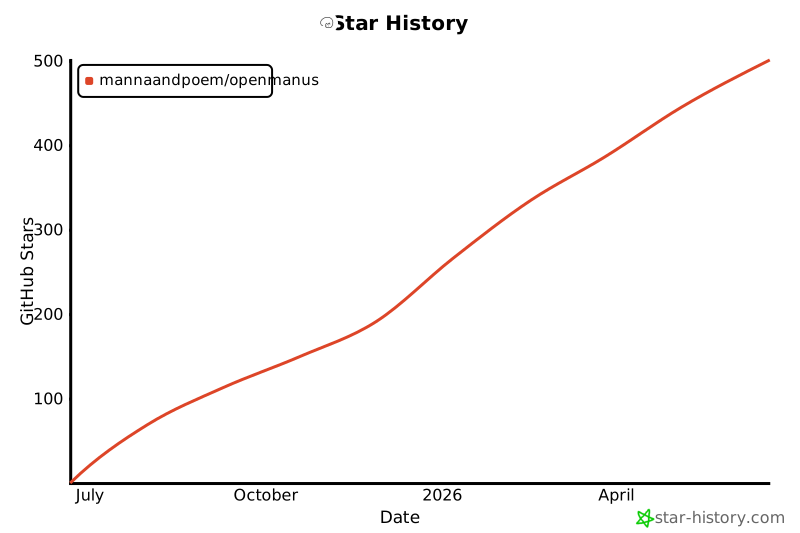
## Star History
[](https://star-history.com/#mannaandpoem/OpenManus&Date)
## Acknowledgement
Thanks to [anthropic-computer-use](https://github.com/anthropics/anthropic-quickstarts/tree/main/computer-use-demo)
and [browser-use](https://github.com/browser-use/browser-use) for providing basic support for this project!
OpenManus is built by contributors from MetaGPT. Huge thanks to this agent community!