File: //opt/DAIN/README.md
# DAIN (Depth-Aware Video Frame Interpolation)
[Project](https://sites.google.com/view/wenbobao/dain) **|** [Paper](http://arxiv.org/abs/1904.00830)
[Wenbo Bao](https://sites.google.com/view/wenbobao/home),
[Wei-Sheng Lai](http://graduatestudents.ucmerced.edu/wlai24/),
[Chao Ma](https://sites.google.com/site/chaoma99/),
Xiaoyun Zhang,
Zhiyong Gao,
and [Ming-Hsuan Yang](http://faculty.ucmerced.edu/mhyang/)
IEEE Conference on Computer Vision and Pattern Recognition, Long Beach, CVPR 2019
This work is developed based on our TPAMI work [MEMC-Net](https://github.com/baowenbo/MEMC-Net), where we propose the adaptive warping layer. Please also consider referring to it.
### Table of Contents
1. [Introduction](#introduction)
1. [Citation](#citation)
1. [Requirements and Dependencies](#requirements-and-dependencies)
1. [Installation](#installation)
1. [Testing Pre-trained Models](#testing-pre-trained-models)
1. [Downloading Results](#downloading-results)
1. [Slow-motion Generation](#slow-motion-generation)
1. [Training New Models](#training-new-models)
1. [Google Colab Demo](#google-colab-demo)
### Introduction
We propose the **D**epth-**A**ware video frame **IN**terpolation (**DAIN**) model to explicitly detect the occlusion by exploring the depth cue.
We develop a depth-aware flow projection layer to synthesize intermediate flows that preferably sample closer objects than farther ones.
Our method achieves state-of-the-art performance on the Middlebury dataset.
We provide videos [here](https://www.youtube.com/watch?v=-f8f0igQi5I&t=5s).
<!---->
<!--[](https://www.youtube.com/watch?v=icJ0WbPsE20&feature=youtu.be)
<!--<iframe width="560" height="315" src="https://www.youtube.com/embed/icJ0WbPsE20" frameborder="0" allow="accelerometer; autoplay; encrypted-media; gyroscope; picture-in-picture" allowfullscreen></iframe>

<!--哈哈我是注释,不会在浏览器中显示。
Beanbags
https://drive.google.com/open?id=170vdxANGoNKO5_8MYOuiDvoIXzucv7HW
Dimentrodon
https://drive.google.com/open?id=14n7xvb9hjTKqfcr7ZpEFyfMvx6E8NhD_
DogDance
https://drive.google.com/open?id=1YWAyAJ3T48fMFv2K8j8wIVcmQm39cRof
Grove2
https://drive.google.com/open?id=1sJLwdQdL6JYXSQo_Bev0aQMleWacxCsN
Grove3
https://drive.google.com/open?id=1jGj3UdGppoJO02Of8ZaNXqDH4fnXuQ8O
Hydrangea
https://drive.google.com/open?id=1_4kVlhvrmCv54aXi7vZMk3-FtRQF7s0s
MiniCooper
https://drive.google.com/open?id=1pWHtyBSZsOTC7NTVdHTrv1W-dxa95BLo
RubberWhale
https://drive.google.com/open?id=1korbXsGpSgJn7THBHkLRVrJMtCt5YZPB
Urban2
https://drive.google.com/open?id=1v57RMm9x5vM36mCgPy5hresXDZWtw3Vs
Urban3
https://drive.google.com/open?id=1LMwSU0PrG4_GaDjWRI2v9hvWpYwzRKca
Venus
https://drive.google.com/open?id=1piPnEexuHaiAr4ZzWSAxGi1u1Xo_6vPp
Walking
https://drive.google.com/open?id=1CgCLmVC_WTVTAcA_IdWbLqR8MS18zHoa
-->
<p float="middle">
<img src="https://drive.google.com/uc?export=view&id=1YWAyAJ3T48fMFv2K8j8wIVcmQm39cRof" width="200"/>
<img src="https://drive.google.com/uc?export=view&id=1CgCLmVC_WTVTAcA_IdWbLqR8MS18zHoa" width="200"/>
<img src="https://drive.google.com/uc?export=view&id=1pWHtyBSZsOTC7NTVdHTrv1W-dxa95BLo" width="200"/>
<img src="https://drive.google.com/uc?export=view&id=170vdxANGoNKO5_8MYOuiDvoIXzucv7HW" width="200"/>
</p>
<p float="middle">
<img src="https://drive.google.com/uc?export=view&id=1sJLwdQdL6JYXSQo_Bev0aQMleWacxCsN" width="200"/>
<img src="https://drive.google.com/uc?export=view&id=1jGj3UdGppoJO02Of8ZaNXqDH4fnXuQ8O" width="200"/>
<img src="https://drive.google.com/uc?export=view&id=1v57RMm9x5vM36mCgPy5hresXDZWtw3Vs" width="200"/>
<img src="https://drive.google.com/uc?export=view&id=1LMwSU0PrG4_GaDjWRI2v9hvWpYwzRKca" width="200"/>
</p>
<p float="middle">
<img src="https://drive.google.com/uc?export=view&id=1piPnEexuHaiAr4ZzWSAxGi1u1Xo_6vPp" width="200"/>
<img src="https://drive.google.com/uc?export=view&id=1korbXsGpSgJn7THBHkLRVrJMtCt5YZPB" width="200"/>
<img src="https://drive.google.com/uc?export=view&id=1_4kVlhvrmCv54aXi7vZMk3-FtRQF7s0s" width="200"/>
<img src="https://drive.google.com/uc?export=view&id=14n7xvb9hjTKqfcr7ZpEFyfMvx6E8NhD_" width="200"/>
</p>
### Citation
If you find the code and datasets useful in your research, please cite:
@inproceedings{DAIN,
author = {Bao, Wenbo and Lai, Wei-Sheng and Ma, Chao and Zhang, Xiaoyun and Gao, Zhiyong and Yang, Ming-Hsuan},
title = {Depth-Aware Video Frame Interpolation},
booktitle = {IEEE Conference on Computer Vision and Pattern Recognition},
year = {2019}
}
@article{MEMC-Net,
title={MEMC-Net: Motion Estimation and Motion Compensation Driven Neural Network for Video Interpolation and Enhancement},
author={Bao, Wenbo and Lai, Wei-Sheng, and Zhang, Xiaoyun and Gao, Zhiyong and Yang, Ming-Hsuan},
journal={IEEE Transactions on Pattern Analysis and Machine Intelligence},
doi={10.1109/TPAMI.2019.2941941},
year={2018}
}
### Requirements and Dependencies
- Ubuntu (We test with Ubuntu = 16.04.5 LTS)
- Python (We test with Python = 3.6.8 in Anaconda3 = 4.1.1)
- Cuda & Cudnn (We test with Cuda = 9.0 and Cudnn = 7.0)
- PyTorch (The customized depth-aware flow projection and other layers require ATen API in PyTorch = 1.0.0)
- GCC (Compiling PyTorch 1.0.0 extension files (.c/.cu) requires gcc = 4.9.1 and nvcc = 9.0 compilers)
- NVIDIA GPU (We use Titan X (Pascal) with compute = 6.1, but we support compute_50/52/60/61 devices, should you have devices with higher compute capability, please revise [this](https://github.com/baowenbo/DAIN/blob/master/my_package/DepthFlowProjection/setup.py))
### Installation
Download repository:
$ git clone https://github.com/baowenbo/DAIN.git
Before building Pytorch extensions, be sure you have `pytorch >= 1.0.0`:
$ python -c "import torch; print(torch.__version__)"
Generate our PyTorch extensions:
$ cd DAIN
$ cd my_package
$ ./build.sh
Generate the Correlation package required by [PWCNet](https://github.com/NVlabs/PWC-Net/tree/master/PyTorch/external_packages/correlation-pytorch-master):
$ cd ../PWCNet/correlation_package_pytorch1_0
$ ./build.sh
### Testing Pre-trained Models
Make model weights dir and Middlebury dataset dir:
$ cd DAIN
$ mkdir model_weights
$ mkdir MiddleBurySet
Download pretrained models,
$ cd model_weights
$ wget http://vllab1.ucmerced.edu/~wenbobao/DAIN/best.pth
and Middlebury dataset:
$ cd ../MiddleBurySet
$ wget http://vision.middlebury.edu/flow/data/comp/zip/other-color-allframes.zip
$ unzip other-color-allframes.zip
$ wget http://vision.middlebury.edu/flow/data/comp/zip/other-gt-interp.zip
$ unzip other-gt-interp.zip
$ cd ..
preinstallations:
$ cd PWCNet/correlation_package_pytorch1_0
$ sh build.sh
$ cd ../my_package
$ sh build.sh
$ cd ..
We are good to go by:
$ CUDA_VISIBLE_DEVICES=0 python demo_MiddleBury.py
The interpolated results are under `MiddleBurySet/other-result-author/[random number]/`, where the `random number` is used to distinguish different runnings.
### Downloading Results
Our DAIN model achieves the state-of-the-art performance on the UCF101, Vimeo90K, and Middlebury ([*eval*](http://vision.middlebury.edu/flow/eval/results/results-n1.php) and *other*).
Download our interpolated results with:
$ wget http://vllab1.ucmerced.edu/~wenbobao/DAIN/UCF101_DAIN.zip
$ wget http://vllab1.ucmerced.edu/~wenbobao/DAIN/Vimeo90K_interp_DAIN.zip
$ wget http://vllab1.ucmerced.edu/~wenbobao/DAIN/Middlebury_eval_DAIN.zip
$ wget http://vllab1.ucmerced.edu/~wenbobao/DAIN/Middlebury_other_DAIN.zip
### Slow-motion Generation
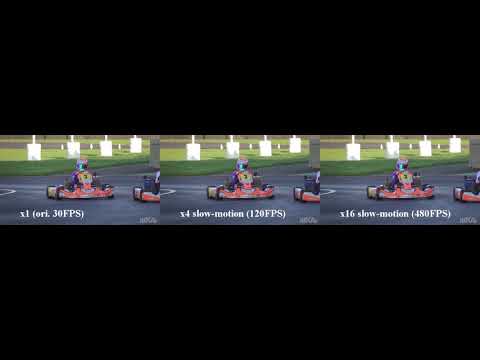
Our model is fully capable of generating slow-motion effect with minor modification on the network architecture.
Run the following code by specifying `time_step = 0.25` to generate x4 slow-motion effect:
$ CUDA_VISIBLE_DEVICES=0 python demo_MiddleBury_slowmotion.py --netName DAIN_slowmotion --time_step 0.25
or set `time_step` to `0.125` or `0.1` as follows
$ CUDA_VISIBLE_DEVICES=0 python demo_MiddleBury_slowmotion.py --netName DAIN_slowmotion --time_step 0.125
$ CUDA_VISIBLE_DEVICES=0 python demo_MiddleBury_slowmotion.py --netName DAIN_slowmotion --time_step 0.1
to generate x8 and x10 slow-motion respectively. Or if you would like to have x100 slow-motion for a little fun.
$ CUDA_VISIBLE_DEVICES=0 python demo_MiddleBury_slowmotion.py --netName DAIN_slowmotion --time_step 0.01
You may also want to create gif animations by:
$ cd MiddleBurySet/other-result-author/[random number]/Beanbags
$ convert -delay 1 *.png -loop 0 Beanbags.gif //1*10ms delay
Have fun and enjoy yourself!
### Training New Models
Download the Vimeo90K triplet dataset for video frame interpolation task, also see [here](https://github.com/anchen1011/toflow/blob/master/download_dataset.sh) by [Xue et al., IJCV19](https://arxiv.org/abs/1711.09078).
$ cd DAIN
$ mkdir /path/to/your/dataset & cd /path/to/your/dataset
$ wget http://data.csail.mit.edu/tofu/dataset/vimeo_triplet.zip
$ unzip vimeo_triplet.zip
$ rm vimeo_triplet.zip
Download the pretrained MegaDepth and PWCNet models
$ cd MegaDepth/checkpoints/test_local
$ wget http://vllab1.ucmerced.edu/~wenbobao/DAIN/best_generalization_net_G.pth
$ cd ../../../PWCNet
$ wget http://vllab1.ucmerced.edu/~wenbobao/DAIN/pwc_net.pth.tar
$ cd ..
Run the training script:
$ CUDA_VISIBLE_DEVICES=0 python train.py --datasetPath /path/to/your/dataset --batch_size 1 --save_which 1 --lr 0.0005 --rectify_lr 0.0005 --flow_lr_coe 0.01 --occ_lr_coe 0.0 --filter_lr_coe 1.0 --ctx_lr_coe 1.0 --alpha 0.0 1.0 --patience 4 --factor 0.2
The optimized models will be saved to the `model_weights/[random number]` directory, where [random number] is generated for different runs.
Replace the pre-trained `model_weights/best.pth` model with the newly trained `model_weights/[random number]/best.pth` model.
Then test the new model by executing:
$ CUDA_VISIBLE_DEVICES=0 python demo_MiddleBury.py
### Google Colab Demo
This is a modification of DAIN that allows the usage of Google Colab and is able to do a full demo interpolation from a source video to a target video.
Original Notebook File by btahir can be found [here](https://github.com/baowenbo/DAIN/issues/44).
To use the Colab, follow these steps:
- Download the `Colab_DAIN.ipynb` file ([link](https://raw.githubusercontent.com/baowenbo/DAIN/master/Colab_DAIN.ipynb)).
- Visit Google Colaboratory ([link](https://colab.research.google.com/))
- Select the "Upload" option, and upload the `.ipynb` file
- Start running the cells one by one, following the instructions.
Colab file authors: [Styler00Dollar](https://github.com/styler00dollar) and [Alpha](https://github.com/AlphaGit).
### Contact
[Wenbo Bao](mailto:bwb0813@gmail.com); [Wei-Sheng (Jason) Lai](mailto:phoenix104104@gmail.com)
### License
See [MIT License](https://github.com/baowenbo/DAIN/blob/master/LICENSE)